ホーム · フリマ写真

Clean up photos of things you're selling

Remove the clutter, fix the light, keep the item honest — listing photos buyers actually stop on.

無料プレビュー
お試しはログイン不要
あなたの写真だけ — 画像から画像へ
+ 写真を追加
スタンダード
本日の空き枠があるあいだ、無料で生成できます。

フリマ写真 — ビフォー & アフター

実際の編集例です。ご自身の写真でも試せます。
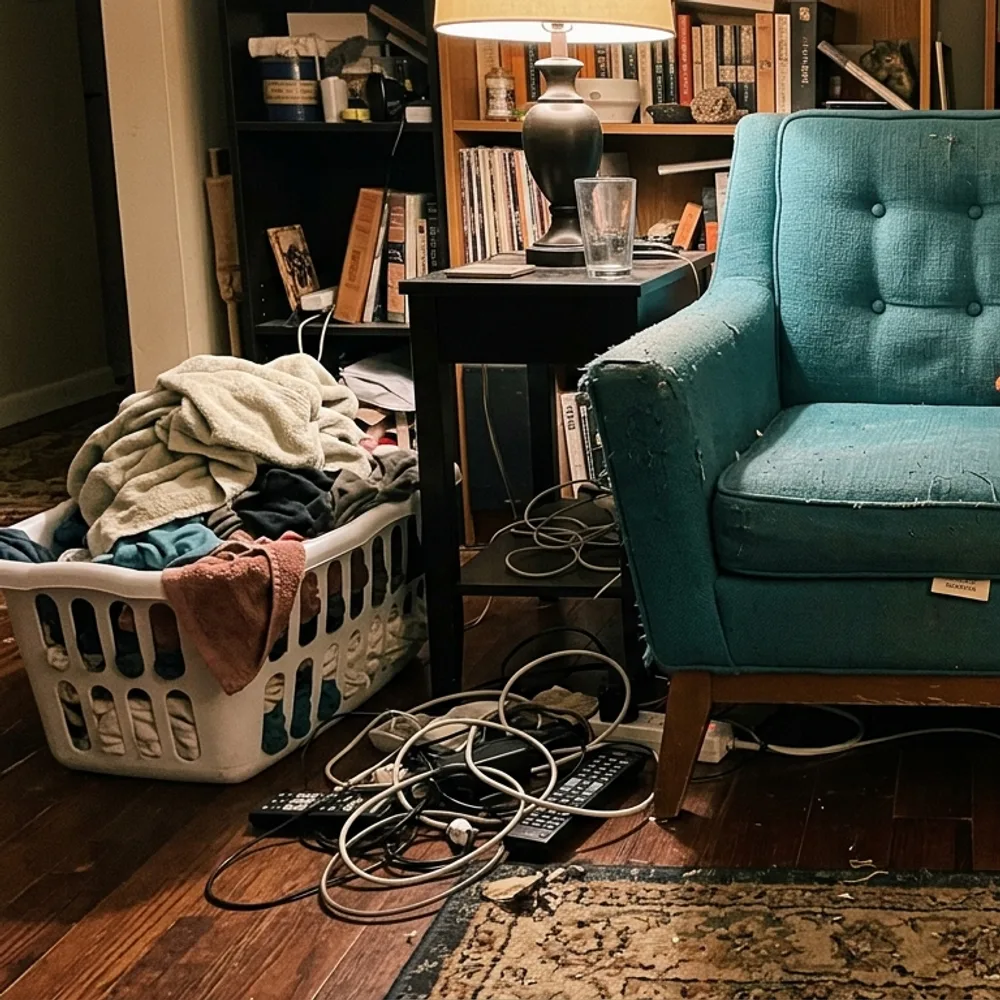
フリマ写真 before
フリマ写真 after
“Clear the room around the armchair”

clean up a listing photoの手順は3ステップ

1

写真をアップロード

編集したい写真をドロップしてください — Fix Your Picは生成画像ではなく、あなたの実際の写真を扱います。

2

編集内容を書く

やりたいことを書くだけ。例:「Remove the clutter around the chair and brighten the photo」。普通の言葉でOK、覚えるツールはありません。

3

結果を受け取る

編集は数秒で完成 — アカウントなしで無料ダウンロードできます。Proならウォーターマークなしのフル解像度で保存できます。

フリマ写真 — よくある質問

Can it hide scratches or damage?+
It won't — and you shouldn't. Buyers see the real item eventually; misrepresenting condition leads to returns and disputes. It cleans up the presentation (light, background, clutter), not the item's condition.
Which platforms is this for?+
Any listing photo — eBay, Facebook Marketplace, Vinted, Depop, Craigslist, Leboncoin. Clean, bright, uncluttered photos sell faster everywhere.
Is it free?+
Yes — upload and edit free, no sign-up. HD downloads without the watermark are a one-time $0.99 per photo.

写真を編集する他の方法